UXTextField
UXTextField is an editable field that contains no text-editing code.
The field gives the backend a buffer, and the platform’s edit engine does
insert, delete, arrows, the caret, and per-position validation. The engine
is GEM’s objc_edit, an NSTextField, a Win32 EDIT, a UITextField, an
EditText, or a GtkEntry. UXButton
follows the same rule and contains no drawing code: the toolkit does not
re-implement what the platform already does.
Whatever edits it, the buffer holds the current text. Native backends sync it before announcing a change, so a change handler always reads what the user typed.
#use <UXKit>Overview
Section titled “Overview”UXTextField* name = new UXTextField();name.setPlaceholder((u8*)"Full name");name.setOnChange(&controller.onNameEdited);content.addSubview(name, UXGeom.make(8, 8, 180, 24));The change hook fires on every keystroke, after the buffer is synced:
void onNameEdited(UXTextField* sender) { validate(sender.text());}A second hook reports the line being finished rather than each keystroke:
name.setOnSubmit(&controller.onNameSubmitted);...void onNameSubmitted(UXTextField* sender) { logIn(sender.text()); // Return was pressed; the key is not in the buffer}For a password, choose the secure treatment before attach, because the native control type is selected at realization:
UXTextField* pw = new UXTextField();pw.setSecure(true);Conforms to
Section titled “Conforms to”- Inherits
UXControl: geometry, enablement, first-responder focus (focus is the caret).
Topics
Section titled “Topics”Text · text · setText Change reporting · setOnChange · fieldDidChange · setOnSubmit · fieldDidSubmit Treatment · setPlaceholder · setSecure · setValidation
u8* text(void)The buffer itself, which every editor operates on.
setText
Section titled “setText”void setText(u8* s)Replaces the content (clamped to capacity), places the caret at the end, and marks the field dirty. It does not fire the change hook, since the code that sets the text already knows about the change.
setOnChange
Section titled “setOnChange”void setOnChange(callback c void(UXTextField* sender))A per-keystroke change hook. Like every action it is a callback, so the field
never owns its controller, and the hook stops firing if that controller is
released. When it fires, the buffer is already synced; read sender.text().
fieldDidChange
Section titled “fieldDidChange”void fieldDidChange(void)The single announcement path. Every backend calls it after its native field
changes (with the buffer synced first), and GEM’s neutral edit path calls it
directly. It also feeds the event tap (UXEventTextChanged) with a copy of
the text, because a recording must hold what was typed at that moment, not what
the buffer contains later.
setOnSubmit
Section titled “setOnSubmit”void setOnSubmit(callback c void(UXTextField* sender))The “the line is done” hook, beside setOnChange. It fires when the user
presses Return, and the key is not treated as a character: a command line,
a search box, and a login form all want to know the line was finished, and
none of them wants to be told a carriage return was typed. Read sender.text()
for what was in the field. A field with no submit hook is unchanged, and keeps
passing Return up the chain.
fieldDidSubmit
Section titled “fieldDidSubmit”void fieldDidSubmit(void)The single submit announcement, the twin of fieldDidChange. Each backend
calls it from wherever its toolkit reports that the line is done — the
NSTextField delegate’s end-editing with a return movement, GtkEntry’s
activate signal, UITextField’s return, the EditText IME’s done action, a
Win32 EDIT receiving a Return key — and the neutral key path calls it
directly where the toolkit’s own editor is what sees the key.
It is deliberately not an event-tap kind: the keystroke that caused it is
already on the tap as UXEventKeyDown, so a recording holds everything a
replay needs. A submit is a callback, like a button’s action.
setPlaceholder
Section titled “setPlaceholder”void setPlaceholder(u8* s)A grey prompt shown while the field is empty, where the platform supports one. Set it before or after attach.
setSecure
Section titled “setSecure”void setSecure(bool on)Masks input as a password. Set it before attach, because the native control type is chosen at realization.
setValidation
Section titled “setValidation”void setValidation(u8* v)A validation string with one character per input position: 9 digits, A
upper case and space, a letters, X anything. The edit engine enforces it on
every keystroke with no extra code.
Platform appearance
Section titled “Platform appearance”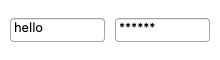
The theme’s field bezel with the shared edit engine’s caret, drawn on canvas with the same Aristo art as GEM.
In the interactive (worker) run loop, a field with the keyboard is edited in a real <input> the page
lays over it, so the browser’s own editing works: IME composition, selection, the clipboard and a phone’s
keyboard. Its text comes back as UTF-8, and Return is the field’s submit.
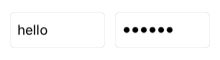
A UITextField. Its editing delegate syncs the buffer first, then fieldDidChange fires.
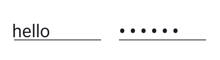
An EditText. A TextWatcher (in the bridge dex) syncs the buffer first, then announces. Secure fields use the platform’s password input type.
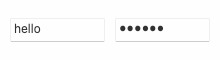
An NSTextField (secure: NSSecureTextField).
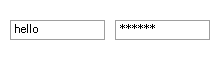
An EDIT child window (EN_CHANGE announces).
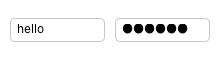
A GtkEntry (secure: GtkPasswordEntry). Its editable signal syncs the buffer first.
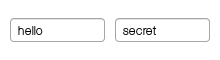
A G_FTEXT with OF_EDITABLE; objc_edit is the editor.
Example
Section titled “Example”A validated numeric field with live feedback:
UXTextField* port = new UXTextField();port.setPlaceholder((u8*)"Port");port.setValidation((u8*)"99999");          // five digit positionsport.setOnChange(&controller.onPortEdited);content.addSubview(port, UXGeom.make(8, 8, 80, 24));
void onPortEdited(UXTextField* sender) {    apply.setEnabled(sender.text()[0] != 0);}