UXGroupBox
UXGroupBox is a titled frame, the ST-dialog way of showing that controls
belong together. It is pure decoration. It draws a rule around its
bounds with the title breaking the top edge, and the grouped controls sit
on top of it as siblings on the canvas. The box does not contain or lay out
anything, so grouping adds no hierarchy.
#use <UXKit>Overview
Section titled “Overview”UXGroupBox* box = new UXGroupBox();box.setTitle((u8*)"Format");content.addSubview(box, UXGeom.make(8, 8, 160, 90));content.addSubview(bold, UXGeom.make(20, 30, 120, 20)); // siblings ON the boxcontent.addSubview(italic, UXGeom.make(20, 56, 120, 20));Add the box before the controls it frames. Later siblings draw on top, which is the stacking a decoration needs.
Conforms to
Section titled “Conforms to”- Inherits
UXView: geometry and the drawing seam; no action, no state.
Topics
Section titled “Topics”setTitle
Section titled “setTitle”void setTitle(u8* t)The text that breaks the top rule. This is the whole API. A group box that needed more would be a container, and this class is not one.
Platform appearance
Section titled “Platform appearance”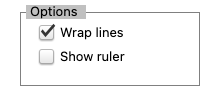
The frame is app-drawn everywhere; the grouped controls inside are this platform’s own (a real toggle idiom per backend).
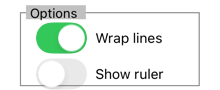
The frame is app-drawn everywhere; the grouped controls inside are this platform’s own (a real toggle idiom per backend).
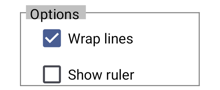
The frame is app-drawn everywhere; the grouped controls inside are this platform’s own (a real toggle idiom per backend).
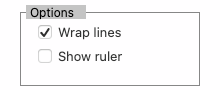
The frame is app-drawn everywhere; the grouped controls inside are this platform’s own (a real toggle idiom per backend).
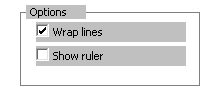
The frame is app-drawn everywhere; the grouped controls inside are this platform’s own (a real toggle idiom per backend).
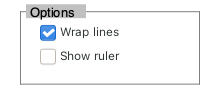
The frame is app-drawn everywhere; the grouped controls inside are this platform’s own (a real toggle idiom per backend).
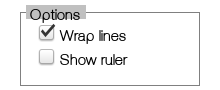
The frame is app-drawn everywhere; the grouped controls inside are this platform’s own (a real toggle idiom per backend).