UXTableView
UXTableView follows the AppKit split: the table does not hold your data,
it asks for it. You implement two methods and the table does the
rest:
protocol UXTableDataSource { i32 numberOfRows(UXTableView* t); u8* valueForCell(UXTableView* t, i32 row, i32 col);}The table also leaves several jobs to other parts of the toolkit:
- Scrollbar. The scroll machinery owns it, fed by
contentHeight. - Hit-testing. The ordinary tree hit test lands a click on a scrolled row, because scrolling moves the rows in the tree.
- Text drawing. A cell is realized content that the platform draws.
- Click routing. A cell does not override
mouseDown, so the responder chain carries the click up to its row. That makes the row the selectable object even though the cell was hit.
On Win32 and AppKit a native table (UXList32, NSTableView) overlays the
whole subtree. On GEM the rows are AES objects.
Lifetime rule: the string valueForCell returns goes straight into the
realized cell and is read on every draw. Nothing is copied. Return a literal
or a buffer the data source owns; it must outlive the table.
#use <UXKit>Overview
Section titled “Overview”class Contacts : Object <UXTableDataSource> { i32 numberOfRows(UXTableView* t) { return people.count(); } u8* valueForCell(UXTableView* t, i32 row, i32 col) { return col == 0 ? nameAt(row) : phoneAt(row); }}
UXTableView* table = new UXTableView();table.addColumn((u8*)"Name", 140);table.addColumn((u8*)"Phone", 100);table.setDataSource(src); // GLOBAL or owned: the table holds it weaklytable.setDelegate(controller);table.reloadData();The data source is held weakly. Keep it alive yourself (a global, or a
controller field). A temporary is released as soon as setDataSource returns.
Topics
Section titled “Topics”Data · setDataSource · reloadData · rowCount Columns · addColumn · numberOfColumns Selection · selection · selectRow · deselectAllRows · isRowSelected · selectedCount · selectedRows · selectedRowList · setRowSelected · setAllowsMultipleSelection · allowsMultipleSelection · setDragsRows Delegate · setDelegate Geometry · setRowHeight · contentHeight · countRows · columnTitle · columnWidth · rowHeightValue
setDataSource
Section titled “setDataSource”void setDataSource(UXTableDataSource* d)Attaches the source, weakly (see above).
reloadData
Section titled “reloadData”void reloadData(void)Asks the source for everything again and rebuilds the rows. Call it after your data changes.
rowCount
Section titled “rowCount”i32 rowCount(void)How many rows the last reload found.
addColumn
Section titled “addColumn”void addColumn(u8* title, i16 width)Appends a titled column of the given width. Call it before the first reload. A table whose columns all have empty titles shows no header row.
numberOfColumns
Section titled “numberOfColumns”i32 numberOfColumns(void)How many columns the table has.
selection
Section titled “selection”i32 selection(void)The anchor row: the last row clicked, or -1 for none. With multi-selection
this is the shift-extend anchor; use isRowSelected for the
full selection.
selectRow
Section titled “selectRow”void selectRow(i32 r)Selects a row from code and announces it through the delegate, on the same path a click takes.
deselectAllRows
Section titled “deselectAllRows”void deselectAllRows(void)Clears the selection and announces it.
isRowSelected
Section titled “isRowSelected”bool isRowSelected(i32 r)Whether the row is in the selection.
selectedCount
Section titled “selectedCount”i32 selectedCount(void)How many rows are selected.
selectedRows / selectedRowList
Section titled “selectedRows / selectedRowList”i32 selectedRows(i32* out, i32 max) // returns the TOTAL selectedi32 selectedRowList(i32* out, i32 max) // returns how many it WROTEBoth fill out with selected row indices, up to max. They differ in what
they return.
setRowSelected
Section titled “setRowSelected”void setRowSelected(i32 r, bool on)Sets one row’s selection without going through the click path. The anchor does not move and no delegate notification fires.
Out-of-range indices are ignored, so restoring a saved selection against a table that has since shrunk needs no bounds check.
setAllowsMultipleSelection / allowsMultipleSelection
Section titled “setAllowsMultipleSelection / allowsMultipleSelection”void setAllowsMultipleSelection(bool on)bool allowsMultipleSelection(void)Off (default): one row at a time. On: ctrl toggles a row and shift extends a range from the anchor, following the platform conventions on every backend.
setDragsRows
Section titled “setDragsRows”void setDragsRows(bool on)Lets a row be dragged out of the table onto one of the app’s windows, where
UXApplication.setItemDropHandler
receives the row’s first column. Off by default. On AppKit, GTK, Windows and the backends where the toolkit draws
the table (the web, GEM).
countRows / columnTitle / columnWidth / rowHeightValue
Section titled “countRows / columnTitle / columnWidth / rowHeightValue”i32 countRows(void)u8* columnTitle(i32 c)i16 columnWidth(i32 c)i16 rowHeightValue(void)The readers behind the setters. A driver uses them to build a native table from the neutral model. An application uses them to lay something out beside the table (a header, a summary line, a print layout) without keeping a second copy of the geometry.
setDelegate
Section titled “setDelegate”void setDelegate(UXTableDelegate* d)Sets the object that receives announcements. The protocol has one optional method:
protocol UXTableDelegate { optional void tableSelectionDidChange(UXTableView* t, i32 row);}setRowHeight
Section titled “setRowHeight”void setRowHeight(i16 h)The uniform row height. It is also the scroll view’s natural line step.
contentHeight
Section titled “contentHeight”i16 contentHeight(void)rows × rowHeight, the value passed to the scroll machinery.
Satellites
Section titled “Satellites”UXTableColumn (title and width),
UXTableHeader (the pinned title
strip), UXTableRow (the selectable
line), and UXTableCell (one
realized string). For hierarchy, see
UXOutlineView, a table whose row
list is derived from a tree.
Platform appearance
Section titled “Platform appearance”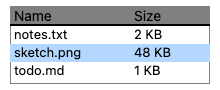
The toolkit-drawn table: header strip, rows, and the selection band.
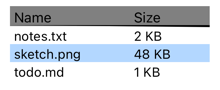
A real UITableView: a cell per row with a label per column, the titles as its header, native scrolling and selection. Rows and cells come from the table’s own data source; a tapped row lands in the model.
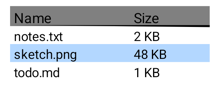
A real ListView under a header row of the column titles: a row per item with a label per column, native scrolling and choice-mode selection. Rows and cells come from the table’s own data source; a tapped row lands in the model.
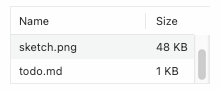
An NSTableView overlays the whole subtree, with native header, rows, and selection.
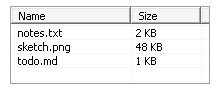
A list-view child window with the system look.
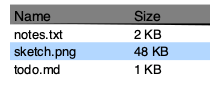
A real GtkColumnView in a scrolled window. Its rows and cells come from the
table’s own data source; a selection made in it lands in the model, and one made
by the app is shown in it. Native rows are taller, so fewer fit.
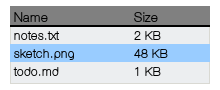
The toolkit-drawn table: header strip, rows, and the selection band.