UXPopUpButton
UXPopUpButton shows one selected item from a list. Clicking pops a menu of the
items, and choosing one selects it. The item list and the selection (by index,
tag, or title) are the pure, testable model. Drawing the closed button and
running the menu are the backend’s job. Where the popup is native (macOS
NSPopUpButton, Win32 COMBOBOX, iOS UIButton+UIMenu, Android Spinner,
GTK GtkDropDown), the OS drops the list and reports the pick back. On GEM the
closed button is a G_POPUP the AES draws with the selected title, and the
driver runs a menu at its bottom-left.
#use <UXKit>Overview
Section titled “Overview”UXPopUpButton* align = new UXPopUpButton();align.addItem((u8*)"Left", 0);align.addItem((u8*)"Centre", 1);align.addItem((u8*)"Right", 2);align.setAction(&controller.onAlign);content.addSubview(align, UXGeom.make(8, 8, 120, 24));The first item added becomes the default selection. The action fires after a pick lands, so the handler reads the current value from the sender:
void onAlign(UXControl* sender) { i32 tag = ((UXPopUpButton* ?)sender).selectedTag(); ...}Conforms to
Section titled “Conforms to”- Inherits
UXControl: theweak:callback action, enablement, the fire path.
Topics
Section titled “Topics”Items · addItem · removeAllItems · count Selection · selectItem · selectByTag · selectByTitle · selectedIndex · selectedTitle · selectedTag
addItem
Section titled “addItem”void addItem(u8* title, i32 tag)Appends an item. The tag is yours: a stable id that survives reordering, so
handlers use selectedTag instead of the index. The first item
added becomes the selection.
removeAllItems
Section titled “removeAllItems”void removeAllItems(void)Empties the list and clears the selection.
i32 count(void)How many items the list holds.
selectItem
Section titled “selectItem”void selectItem(i32 i)Selects by index (out-of-range picks are ignored). Programmatic selection does not fire the action.
selectByTag
Section titled “selectByTag”void selectByTag(i32 tag)Selects the first item carrying the tag.
selectByTitle
Section titled “selectByTitle”void selectByTitle(u8* title)Selects the first item whose title matches.
selectedIndex
Section titled “selectedIndex”i32 selectedIndex(void)The current pick, -1 when the list is empty.
selectedTitle
Section titled “selectedTitle”u8* selectedTitle(void)The current pick’s title, "" when there is none.
selectedTag
Section titled “selectedTag”i32 selectedTag(void)The current pick’s tag, -1 when there is none. This is the id a handler
usually wants.
Platform appearance
Section titled “Platform appearance”
The theme’s popup bezel with its disclosure chevron: the same Aristo art GEM draws, on canvas.

A real UIButton carrying a UIMenu, the platform’s pull-down idiom. The pick lands through applyNativeSelection.

A real Spinner over an ArrayAdapter. Its selection listener attaches after the initial pick, so only user choices report.
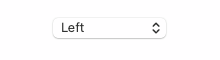
A real NSPopUpButton.
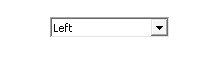
A real COMBOBOX (drop-list style).
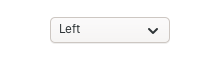
A real GtkDropDown over a string list, its selected property feeding the peer.

The themed bezel; the driver runs the menu at the button’s bottom-left.
Example
Section titled “Example”A units picker whose tag is the conversion factor id:
UXPopUpButton* units = new UXPopUpButton();units.addItem((u8*)"Pixels", 0);units.addItem((u8*)"Millimetres", 1);units.addItem((u8*)"Inches", 2);units.selectByTag(savedUnit);units.setAction(&controller.onUnits);content.addSubview(units, UXGeom.make(8, 8, 140, 24));