UXTabView
UXTabView is a tabbed panel: a set of tabs, each a label and a content
view. Selecting a tab shows its content and hides the others. The tab
model (which tab is selected, its label, its content) is pure and
unit-testable. Applying the visibility needs a live tree, so it runs in
layoutTabs once the content views are in a window. The
tab strip is usually a
UXSegmentedControl placed
above the content area. The picker and the panel are separate views that
you compose.
#use <UXKit>Overview
Section titled “Overview”UXTabView* tabs = new UXTabView();tabs.addTab((u8*)"General", generalPane);tabs.addTab((u8*)"Advanced", advancedPane);
UXSegmentedControl* picker = new UXSegmentedControl();picker.addSegment((u8*)"General", 0);picker.addSegment((u8*)"Advanced", 1);picker.selectSegment(0);picker.setAction(&controller.onTab);
void onTab(UXControl* sender) { tabs.selectTab(((UXSegmentedControl* ?)sender).selectedSegment()); tabs.layoutTabs();}Topics
Section titled “Topics”Tabs · addTab · count · labelAt · contentAt Selection · selectTab · selectedIndex · selectedLabel · selectedContent · isTabVisible Applying · layoutTabs
addTab
Section titled “addTab”void addTab(u8* label, UXView* content)Appends a tab. You own the content view: build it and add it to the window. The tab view manages only its visibility.
i32 count(void)How many tabs there are.
labelAt / contentAt
Section titled “labelAt / contentAt”u8* labelAt(i32 i)UXView* contentAt(i32 i)A tab’s label and content view.
selectTab
Section titled “selectTab”void selectTab(i32 i)Changes the model’s selection. An out-of-range index is ignored. Call
layoutTabs afterwards to apply it.
selectedIndex / selectedLabel / selectedContent
Section titled “selectedIndex / selectedLabel / selectedContent”i32 selectedIndex(void)u8* selectedLabel(void)UXView* selectedContent(void)The current tab’s index, label and content view.
isTabVisible
Section titled “isTabVisible”bool isTabVisible(i32 i)The model’s answer: true only for the selected tab.
layoutTabs
Section titled “layoutTabs”void layoutTabs(void)Applies the model to the tree by calling setHidden on every content view
except the selected one. Call it only once the content views have owners; a
detached view cannot be hidden.
Platform appearance
Section titled “Platform appearance”Each screenshot shows a UXSegmentedControl picker (General | Advanced) over
the tab view’s content area, with the General pane showing.
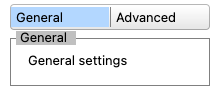
The Aristo segmented picker over the app-drawn pane.
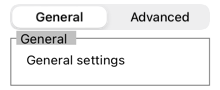
A native UISegmentedControl picker over the pane.
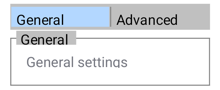
Native toggle buttons as the picker, over the pane.
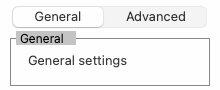
A native NSSegmentedControl picker over the pane.
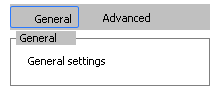
Native button segments as the picker, over the pane.
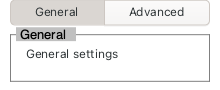
Linked GtkToggleButtons as the picker, over the pane.
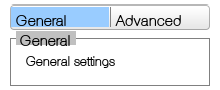
AES button segments as the picker, over the pane.